
By the Elo-X team · Updated 23 October 2026
Keep score, save results or run a competition?
Counting points helps you through a game. A result log helps you remember what happened. A league gives everyone a reason to come back. “Score tracker” can mean all three, so the right choice starts with what you want to keep.
Our pick for a regular playing group is Elo-X: confirmed results, skill ratings and shared standings across the games you compete in. For live point counting or managing a game collection, compare the specialist options below. For a defined event, compare the tournament workflows too.
Six options. Six starting points.
We make Elo-X. These recommendations compare documented workflows against different needs, using the linked product pages checked on 23 October 2026. This is an editorial comparison, not a hands-on test of every app.
Elo-X
The office table has a champion. Your friends disagree about who usually wins. Elo-X gives those rivalries a record: play in real life, log the result and let the participants confirm it before it counts.
- Results you check together. One player submits; the relevant participants review and confirm.
- Ratings with context. Glicko-2 ratings, match history and head-to-head records put the games behind the standings.
- Your own competition. Groups use standard activities or custom formats for individuals, teams, winners or placements. Run a separate tournament when you want stages and a finish.
Choose Elo-X if the same friends, colleagues or club members keep playing and want a shared leaderboard that develops over time.
Participants need their own accounts. You can plan a match or log it afterward, including game or set scores when score tracking is enabled. This is not a live scoreboard for every point. Available global leaderboards depend on the activity and variant.
Try Elo-X with your group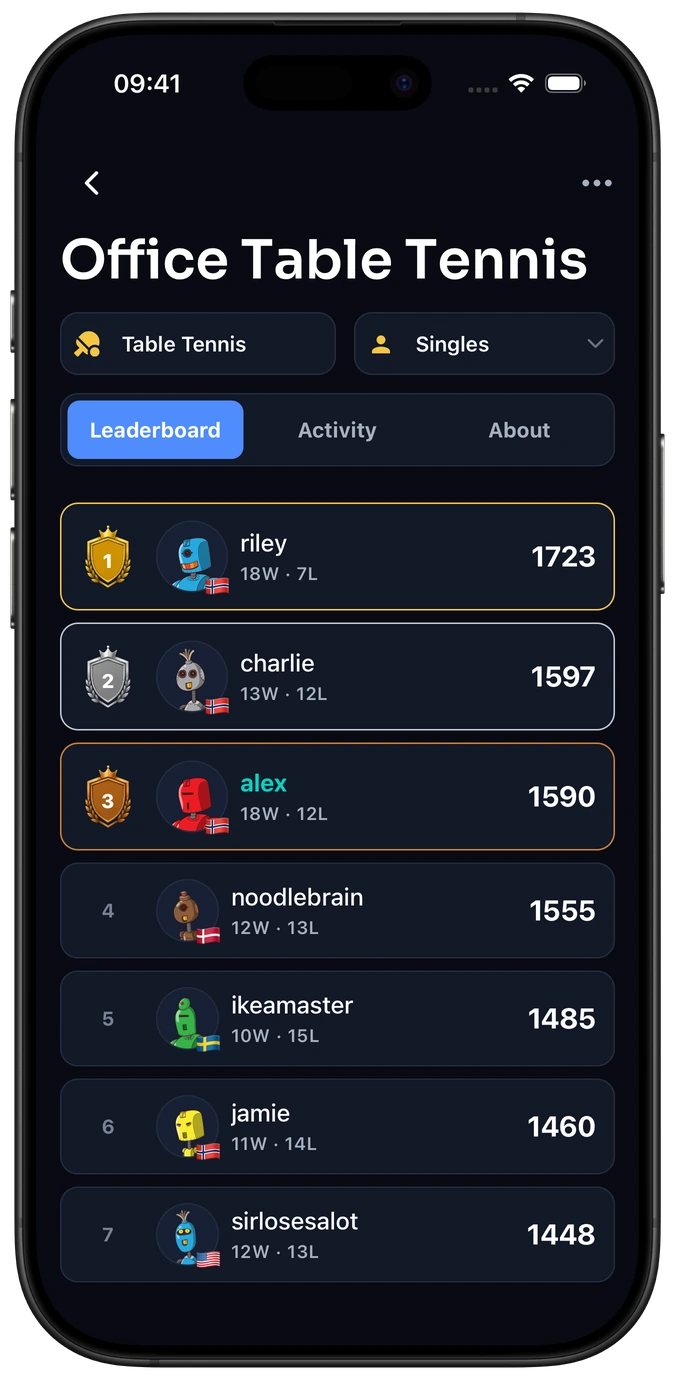
Score tracker by Romain Lebouc
If your main question is “what’s the score right now?”, a dedicated points counter is a sensible place to start. Score tracker focuses on entering, adjusting and reviewing scores as a game unfolds.
- Customisable point buttons and round-by-round entry.
- Support for 2–20 players, with players added or removed during play.
- Game history to pause and resume, plus a timer and dice roller.
Choose it if you want a practical score keeper for tonight’s card game, board game or points-based activity.
Board Games Tracker
Game night often comes with another question: what should we play next? Board Games Tracker brings your play history and player statistics together with a catalogue and the games you own.
- Log game results, scores and winners.
- Follow win rates, head-to-head records and streaks.
- Browse games and maintain a collection, on Android or in a browser.
Choose it if board game records and collection management are central to your routine. If you want a custom competition for a specific game instead, see Elo-X’s board game group setup.
Track Matches
If you mostly want to look back at your own season, Track Matches offers sport-specific trackers for tennis, badminton, pickleball and padel. Its focus is understanding your matches and the opponents you face.
- Match results, win rates and streaks.
- Opponent records and performance history.
- Monthly breakdowns and doubles-partner statistics.
Choose it if your priority is a personal match log for one of those racket sports. Compare that with whether your whole group wants to participate in a shared competition.
Rankat
Some groups want an ongoing ladder. Others want a one-day cup with a clear winner. Rankat describes both league tracking and tournament management, making it an option when the event format matters.
- Elo leagues, match history and head-to-head records.
- Single-elimination brackets and round-robin formats.
- Automatic match scheduling for tournaments.
Choose it if brackets or round-robin scheduling are part of the job. Elo-X also supports Swiss, round robin, group stages, knockout and combinations. Compare the event setup, rating system and result-confirmation workflow rather than treating tournaments as exclusive to one app.
Excel or Google Sheets
A spreadsheet is a good choice when one organiser enters guest names, adds round points and applies house rules. You control the columns, formulas and corrections; your group agrees how results are checked.
Start with our example game score sheet (CSV). It has three rounds and a =SUM(B2:D2) total for the first player. Open it in Excel or import it into Google Sheets; if it opens in one column, choose comma-separated import. Sort high to low, or low to high, according to your game.
Choose a sheet if custom totals matter more than built-in player profiles or shared match history. You can also count points in a sheet and record the finished result in Elo-X. The CSV is standalone; Elo-X does not import it.
What to look for before you choose.
- What happens during the game?
- Choose live point entry if you need a counter. Choose completed-result tracking if you want the record after the last point.
- Who enters and checks the result?
- A single organiser may prefer guest names on one device. A playing group may value individual accounts and participant confirmation.
- What should carry into next week?
- Look for the history, rival records, group standings or tournament structure you will actually return to.
Keep raw points and skill ratings distinct. Ten points in one game do not mean the same as ten in another. Elo-X’s Glicko-2 ratings consider confirmed outcomes, opponents and rating uncertainty; keep separate games and variants in separate competitions.
Our verdict: choose the workflow your group needs.
For friends, clubs and office rivals who want an ongoing competition, Elo-X is our recommendation. Player confirmation, flexible groups and ratings make it a strong fit when the people you play with matter as much as the score.
A live points counter is the better starting point for counting rounds. A collection tracker suits your game shelf. For a scheduled cup, compare the event formats and participant workflow. Pick the job first, then the app.
Ready for your group’s next game? Create your competition, invite your players and log one finished result. For a workplace table, follow our office ping pong guide.
Frequently asked questions
Is a score keeper the same as a scoreboard app?
The names overlap. A scoreboard or score keeper often counts points during play; a result tracker saves finished games. Check whether you need live point entry, a lasting match history or ongoing standings.
Can I track board games and sports in Elo-X?
Yes. Use standard activities or configure a custom group for your game. Keep different games and variants in separate competitions when you want separate standings. See examples of activities you can play.
Does everyone need an account to use Elo-X?
Participants in confirmed Elo-X matches use their own accounts to review results. If one person simply wants to type guest names into a points sheet, a spreadsheet or score counter may be simpler.

